

Built for Magento merchants
One Magento integration, clearer tracking
Prepare ecommerce data in Magento, then use Google Tag Manager to route it to the Google tags your store needs.
- GTMCentral tag management
- GA4Ecommerce events
- ConsentConsent Mode v2
- Google AdsConversion tracking
- RemarketingProduct context
- EnhancedConversion variables
- Data layerMagento EAV mapping
- Server URLOptional container endpoint
From Magento data to configured Google tags
The extension prepares Magento product, category, cart, checkout, and customer context as data-layer events. GTM then routes that data to the tags you configure.
- Magento storefront
- Ecommerce data layer
- Google Tag Manager
- GA4
- Google Ads
- Consent Mode v2
Magento ecommerce event tracking
Follow the customer journey with ecommerce events that your GTM destinations can use.
Discovery
view_item_listselect_itemview_item
Cart
add_to_cartremove_from_cartview_cart
Checkout
begin_checkoutadd_shipping_infoadd_payment_info
Conversion
purchase
Customer
loginsign_uplogout
Admin and offline events
Administrator-created order tracking can produce purchase. Refund and order-cancellation handling produces refund when enabled and configured with Measurement Protocol credentials.
Make Magento conversion data usable in Google Ads
Measure configured conversion actions such as purchases, provide product context for appropriately configured dynamic remarketing tags, and use the supplied GTM container variables for enhanced conversions.
- Configure your Google Ads destination and applicable consent or legal basis in GTM.
- Import the supplied GTM container as a starting point, then review its tags for your store.
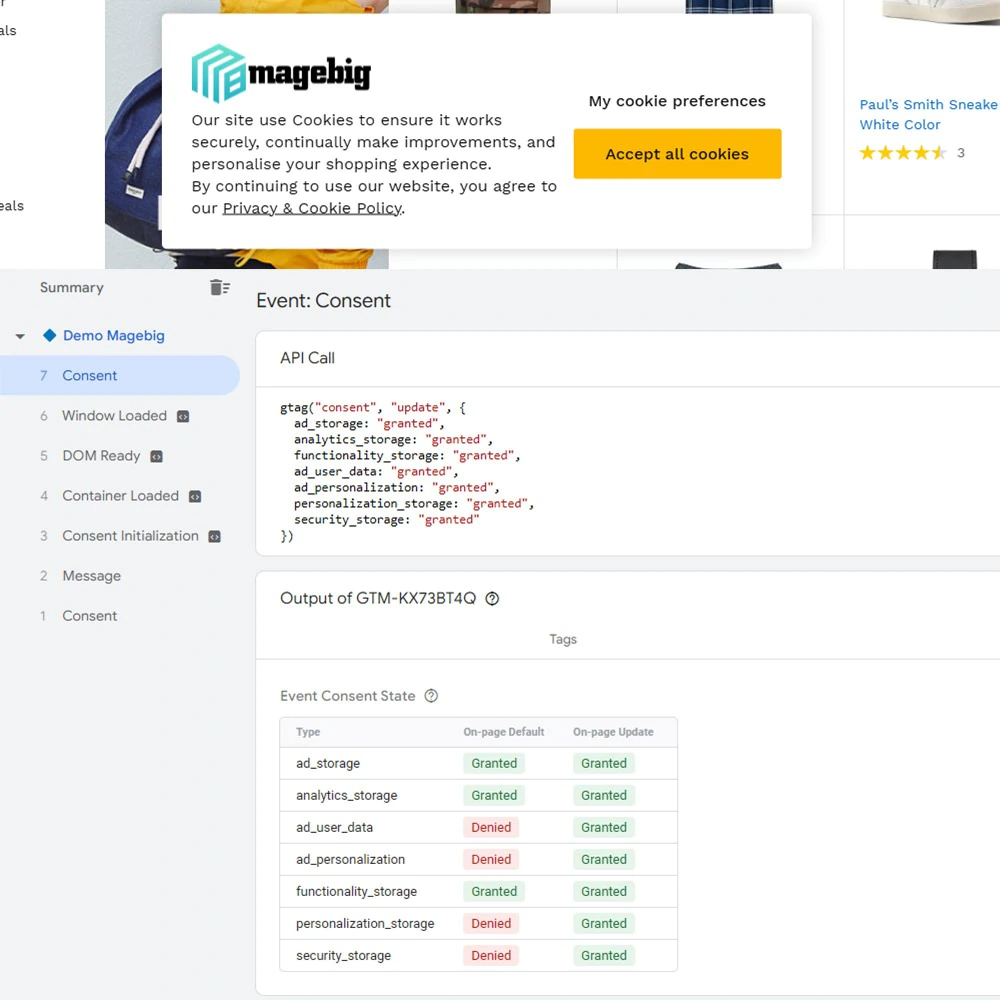
Give visitors meaningful consent controls
The extension provides a configurable consent popup and passes configured consent states to Google tags. It helps support a GDPR-oriented consent implementation; merchant legal review, cookie inventory, regional behavior, and tag configuration remain required.
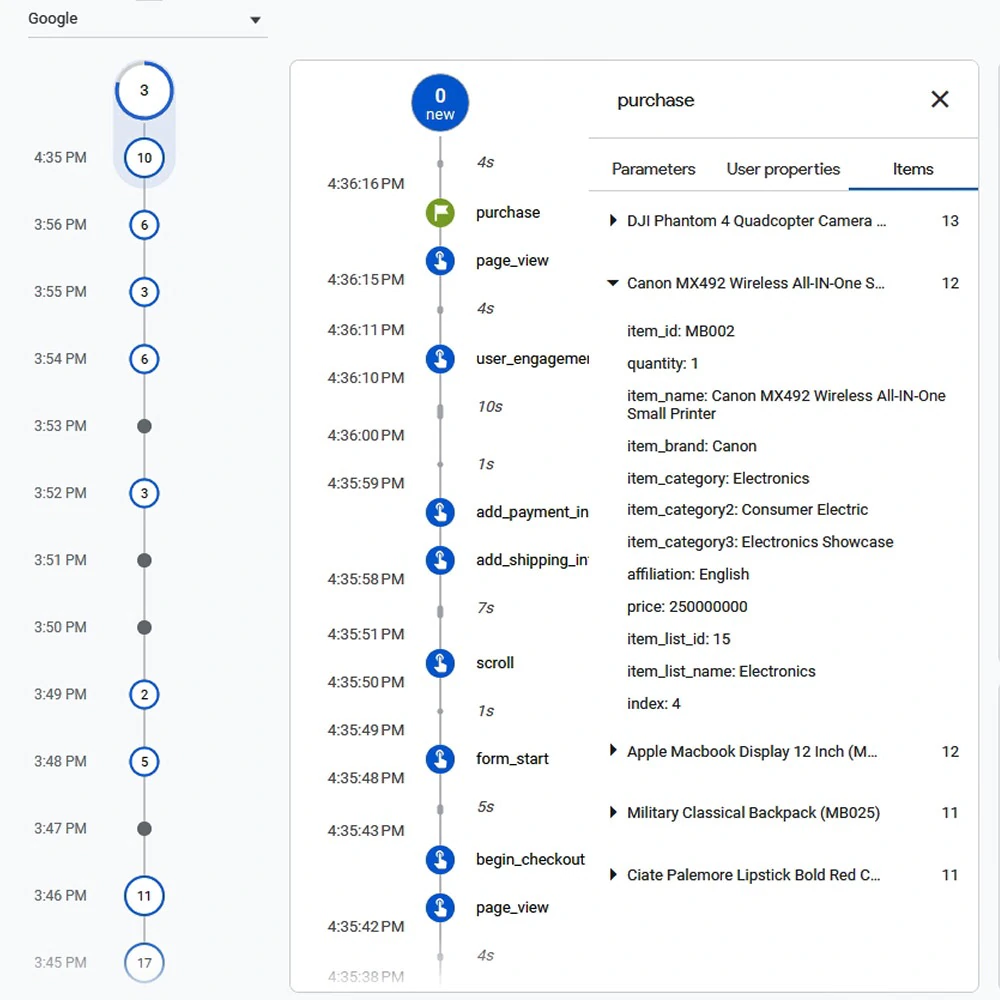
Inspect the data your Magento store sends
This purchase-event debug example includes item parameters such as SKU, product name, category, price, quantity, and checkout context. Available fields depend on your product, category, customer attribute mappings, and GTM configuration.
Use the data layer as a transparent hand-off between Magento and the measurement destinations configured in GTM.
Setup, loading, and implementation facts
Container import
Admin configuration can generate GTM import files, including a Google Ads variant.
Controlled loading
GTM loading is configurable and supports delayed insertion. Test the selected setting against your consent requirements.
Magento integration
Use EAV mapping, minicart view_cart, checkout information events, Hyvä support, and an optional Server Container URL.
Content Security Policy note
The module supplies payment-page CSP settings for Magento 2.4.7+. Verify them against your deployed CSP and custom GTM tags.
Why use this extension?
- Keep ecommerce event generation in one Magento integration.
- Configure destinations and tags centrally in GTM.
- Avoid editing storefront templates for each tracking tag.
- Map relevant Magento EAV data when it is needed.
- Keep consent signaling, ecommerce tracking, and Ads setup in the same implementation path.
Compatibility and technical details
| Magento | 2.4.x, 2.4.9 |
|---|---|
| Editions | Open Source and Adobe Commerce options |
| Theme | Magento storefront and Hyvä support |
| Tracking | GTM, GA4 ecommerce data layer, Google Ads import option |
| Consent | Configurable Consent Mode v2 popup and categories |
| Server container | Optional Server Container URL |
| CSP | CSP support for gtag custom scripts |
Sign In